Create a Poster with Bing
Create a Poster with Bing
Bing AI turns your text descriptions into professional poster designs in just seconds.
No watermarks, create freely, high resolution.
We are not associated with, endorsed by, or affiliated with Microsoft or Bing.
Create a Poster with Bing
Describe your perfect poster and let Bing's AI create it
Create a Poster with Bing - Examples
See what beautiful posters Bing's AI can create. Click on any example to use it as a prompt.

Elegant Afternoon Tea Poster
An elegant poster featuring English afternoon tea at a luxury London hotel, delicate finger sandwiches, scones with clotted cream and colorful macarons on a three-tier silver stand, fine porcelain teacups, soft feminine aesthetic, pastel colors, bright clear lighting, perfect for lifestyle bloggers.

Paris Café Poster
Typical French café scene in Paris, close-up of a golden flaky croissant and a creamy espresso with heart-shaped latte art on a round marble table, cobblestone street and flower shop blurred in background, warm morning light, cinematic "Parisian" aesthetic, soft bokeh, premium travel blogger style.

Ghibli Style Girl Poster
Ghibli artistic style, a young woman in a flowing white dress running through a meadow of colorful wildflowers, wicker picnic basket beside, gentle wind blowing her hair, blue mountains in distance, soft pastel light, high definition hand-drawn illustration, pure and ethereal.

Fairy Tale Illustration Poster
Whimsical children's book illustration, grandfather elephant telling stories to baby forest animals under a large glowing mushroom, warm firefly lighting, magical forest background, soft pastel colors, hand-drawn crayon texture.

Boston Tourist Map Poster
Create a Boston sightseeing route map.

Bouillabaisse Cooking Process Poster
Create an infographic showing the cooking process of traditional French bouillabaisse.

Water Cycle Diagram Poster
Simple educational infographic titled "The Water Cycle: Nature's Journey" with a simple blue and white natural theme design. Display the following labels in a circular or flowchart format: Precipitation, Transpiration, Condensation, Runoff and Collection, Groundwater Flow. Include simple icons of rain, plants, clouds, bodies of water, and groundwater. Use blue and soft white color tones, clear steps circular layout.

Photosynthesis Steps Poster
Simple educational infographic titled "5 Steps of Photosynthesis" with a simple natural theme design. List the steps: 1. Light Absorption, 2. Water Splitting, 3. Oxygen Release, 4. Energy Conversion, 5. Glucose Production. Include leaf or sun icons, text at bottom: "Photosynthesis uses light, water, and CO₂ to create oxygen and energy for plants. Essential for life on Earth." Use green and soft yellow color tones, clear steps layout.

Fantasy Audiobook Cover Poster
Epic fantasy audiobook cover, a young female warrior with a glowing sword overlooking a vast ancient elven city at sunset, vibrant warm colors, detailed armor, wide-angle lens, digital painting style, similar to Studio Ghibli but more mature, intricate details.

4-Panel Comic Poster
Japanese manga style 4-panel comic. Male with glasses (Kenji) and orange-haired woman. Panel 1: Kenji reading on living room sofa, orange-haired woman rushes in with cardboard box shouting "Kenji! Look! Finally arrived!" Panel 2: Kenji stands up, woman hands small pudding cup: "Legendary 'Milky Way Pudding' limited edition!" Panel 3: Kenji pushes glasses skeptically: "Looks like regular pudding with glitter." Panel 4: Woman happily eating pudding: "Mood matters! Delicious!" Kenji whispers: "As long as you're happy..."

Business Data Dashboard Poster
Simple professional business data dashboard infographic titled "Q4 Smartphone and Team Performance Overview". Layout with four quadrants: blue bar chart showing monthly sales growth, colorful pie chart showing market share distribution, blue line chart showing sales trends for 4 models (Y, Z, W, V), blue radar chart showing team capability assessment. Minimalist design, clear text labels, data annotations, brief summary under each chart. Modern corporate style, high resolution, white background.

Skincare Product Photography Poster
Premium elegant skincare product photography, frosted glass dropper bottle with gold cap and open white moisturizer cream jar on white marble dressing table, fresh green aloe vera leaf with water droplets and white jasmine flower beside. Bright softly blurred modern bathroom background. Elegant black serif font text at top: "Instant radiance. Deep hydration. Clinically proven." Bright airy lighting, soft natural shadows. Professional commercial photography, minimalist aesthetic.

Farmhouse Kitchen Poster
A beautiful poster of a farmhouse kitchen with soup and spices on the countertop, warm light, shallow depth of field

Juice Bottle Product Poster
A vibrant product poster featuring a juice bottle surrounded by paper waves, quilling style, pastel colors

Cozy Cat Poster
A warm and cozy poster of a sleeping cat lying in the sunlight on a windowsill in mid-day, retro color palettes, shallow depth of field

Bluebird Folk Art Poster
A simple folk style poster illustration of a bluebird with red and yellow flowers

Maple Tree Vintage Poster
A vintage-style poster featuring a maple tree in the middle of a green field, blue sky, warm color palette, autochrome style
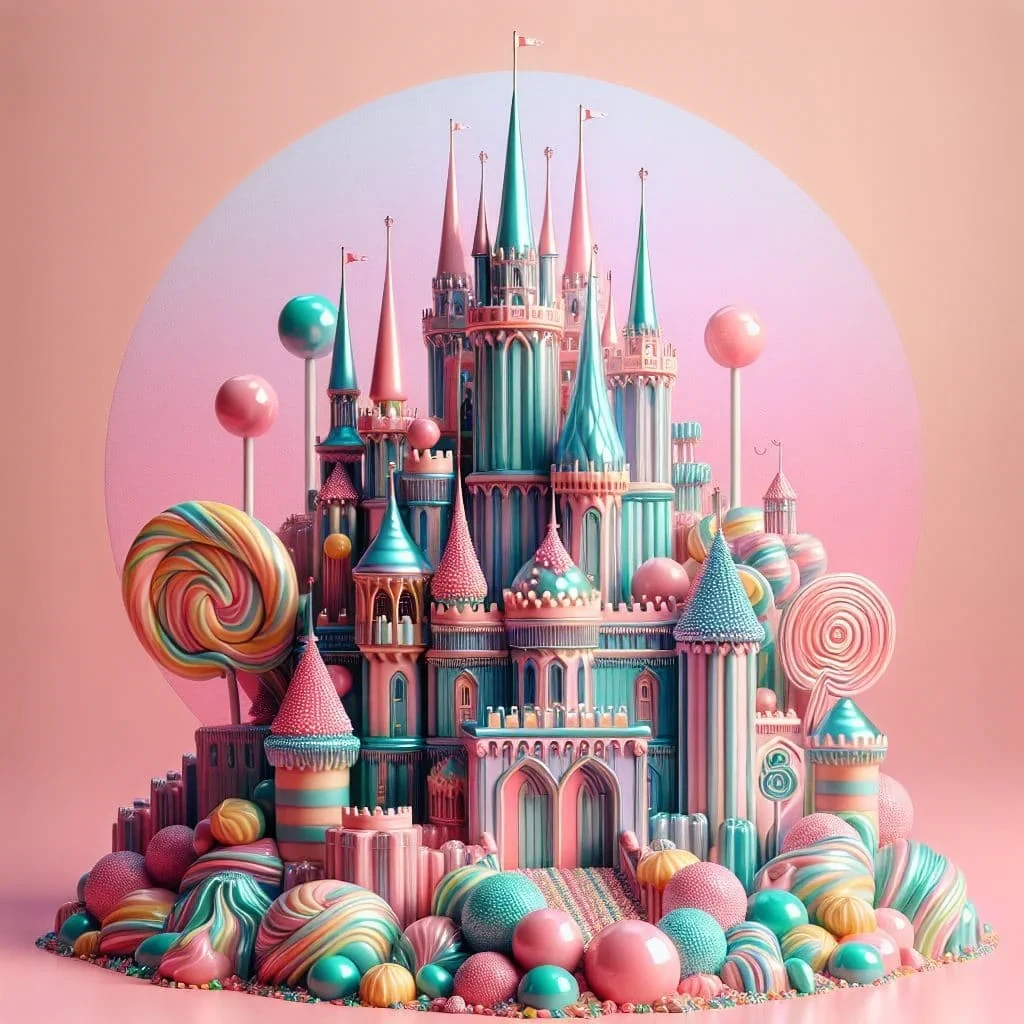
Surreal Candy Castle Poster
A whimsical poster of a castle made out of gumdrops and lollipops on a pink background, 3D hyper-surrealism, shiny, metallic, pastel colors
Why Create Posters with Bing?
Bing Image Creator makes designing posters easy. Just describe your perfect poster, and watch the text-to-image transformation happen in seconds. You'll get vivid, high-resolution posters with great detail.
High Image Quality
Our advanced AI delivers posters with superior image quality, featuring ultra-high resolution, vibrant colors, and intricate details that make your designs stand out.
Multiple Size Options
Create posters in any dimension you need. Choose from preset sizes optimized for different poster types or customize dimensions to perfectly fit your requirements, ensuring your posters look great in any format.
Comprehensive Multilingual Support
Generate posters using prompts in any language. Our AI understands and processes requests in multiple languages, making it easy to create posters for diverse global audiences with authentic local expressions.
Lightning Fast Generation
Create posters in mere seconds, not minutes. Our optimized AI delivers professional poster designs quickly, allowing you to iterate and refine your ideas without delay.
Watermark-Free
All generated posters are completely watermark-free, giving you full ownership and flexibility to use them anywhere.
Commercial Usage
Use your AI-generated posters for any commercial purpose, including marketing, advertising, and business materials.
Create a Poster with Bing in 4 Simple Steps
Turn your ideas into professional posters with Bing's AI in just a few clicks
Describe your poster vision
Tell Bing exactly what kind of poster you want to create. Include details like style, theme, colors, and any key elements.
Choose poster size
Select the perfect dimensions for your poster from our preset options or set custom size for any purpose.
Generate your poster
Bing's AI processes your request and creates a unique, high-quality poster tailored to your specifications.
Download & use your poster
Get your poster in high resolution and use it for events, marketing, decorations, or any other purpose.
Frequently Asked Questions
Everything you need to know about creating posters with Bing
What is Bing Image Creator?
+Bing Image Creator is an AI-powered tool that turns your text descriptions into posters. It uses advanced generative AI technology to create professional-looking posters based on your prompts. Our text-to-image generator specializes in producing high-quality posters for various purposes by processing your detailed descriptions.
What is AI image generation and how does it work for creating posters?
+AI image generation is a technology that creates images from text descriptions using deep learning models. When you input a text prompt for a poster, our AI analyzes the description and generates a professional poster by synthesizing patterns it has learned from millions of images. This process allows for instant poster creation from your imagination.
What are the best prompts for creating posters with AI?
+The most effective prompts for creating posters with AI include detailed descriptions of subject, style, lighting, composition, and mood. For example: "A vibrant movie poster for a sci-fi film with a futuristic cityscape at sunset, 4K ultra detailed, cinematic style". Our AI poster creator excels with specific artistic style references like 'minimalist', 'retro', or 'watercolor'.
How do I create posters with Bing Image Creator?
+Simply describe your perfect poster in the prompt box, select your preferred poster size from our preset options, and click "Generate with Bing". Bing will process your request and create a unique poster based on your description. Our poster generator makes it easy to turn your ideas into visuals instantly.
Can I generate realistic posters with AI?
+Yes! Our AI poster generator can create highly realistic posters by including terms like 'photorealistic', 'ultra-detailed', 'high-resolution 8K', and specific printing considerations in your prompts. For the best results, provide detailed descriptions of the poster's purpose, imagery, layout, and desired visual style.
How to Use Bing Image Creator for Beginners?
+For beginners, start with simple, clear prompts describing what you want to see. Include basic elements like subject, style, and mood. As you get more comfortable, you can add more specific details about lighting, composition, and artistic styles.
How do I create better prompts for poster creation?
+For poster creation, add specifics about style, lighting, color palette, and composition, or use AI-enhanced prompts to refine and try again. Include details like poster purpose (movie, event, marketing), target audience, and desired emotional impact. Our poster generator responds well to detailed artistic direction like 'cinematic lighting', 'vibrant color scheme', or 'minimalist composition'.
What artistic styles can I use for poster creation with Bing?
+Our AI supports a wide range of artistic styles including but not limited to: photorealistic, impressionist, surrealist, cyberpunk, steampunk, watercolor, oil painting, digital art, cartoon, anime, pixel art, and many more. Simply include the style name in your text prompt to generate posters in your desired aesthetic. Perfect for movie posters, event flyers, marketing materials, and more.
Can I use AI-generated posters for commercial purposes?
+Yes, you can use the posters generated by Bing Image Creator for various commercial applications such as marketing materials, event promotions, social media content, website design, presentations, and more. Our AI tool is designed to help businesses and creators generate professional visual content quickly and efficiently.
How To Use Bing Image Creator To Create Cool Posters?
+To create impressive posters, experiment with detailed prompts that include artistic styles, specific lighting conditions, emotional tones, and compositional elements relevant to your poster's purpose. For example: "A cool concert poster with neon lights and a rock band silhouette, retro 80s style, vibrant colors". Don't be afraid to try unusual combinations and refine your prompts based on the results to get the perfect poster.
What languages are supported?
+We provide comprehensive multilingual support, understanding and processing requests in multiple languages. Whether you use English, Chinese, Spanish, French, or other languages, we can accurately generate posters that meet your needs.
What image formats are supported?
+Bing Image Creator generates images in common formats like JPG and PNG. You can download the images in high-resolution formats suitable for various uses.
Can I download posters from Bing Image Creator?
+Yes, after generation you can download the image directly.
What types of posters can I create with AI?
+You can create various types of posters including movie posters, event posters, concert posters, promotional posters, recruitment posters, exhibition posters, restaurant menu posters, fitness posters, and more. Simply describe your poster type in the prompt and our AI will generate it for you.
Can AI posters be printed?
+Yes, our AI poster generator creates high-resolution images suitable for printing. You can download posters in JPG or PNG format at resolutions that work well for both digital and print use. For best print quality, use detailed prompts and select larger image sizes.
What poster sizes are available?
+We support various poster sizes including square (1:1), landscape (16:9, 4:3), portrait (9:16, 3:4), and custom sizes from 1024 to 4096 pixels. Common poster sizes like A4, A3, and social media dimensions are all supported.
Can I add text to AI-generated posters?
+While our AI generates the visual design of your poster, you can include text elements in your prompt description. For professional text layout, we recommend adding text using design software after generating the base poster image.
Can I use AI posters for social media?
+Absolutely! AI-generated posters are perfect for Instagram posts, Facebook covers, Twitter headers, Pinterest pins, and other social media platforms. Choose the appropriate size for each platform when generating your poster.
Are AI-generated posters copyright-free?
+AI-generated posters can be used for personal and commercial purposes depending on your subscription plan. However, avoid including copyrighted characters or brand logos in your prompts. Always review our terms of service for the latest licensing information.
How to create professional-looking posters with AI?
+To create professional posters, include specific details about style, color scheme, composition, and mood in your prompt. Use terms like "minimalist design", "bold typography", "professional layout", or "cinematic composition" for better results.
How to write good prompts for poster creation?
+Good poster prompts include: poster type (movie, event, etc.), main subject, style (minimalist, retro, modern), color scheme, mood, and any specific elements. Example: "A modern concert poster with neon lights and band silhouette, dark background, vibrant colors, professional design".
How long does generation take?
+Most images are generated within 10 seconds, depending on complexity and server load.
Can Bing Image Creator create movie posters?
+Yes! Bing Image Creator is perfect for creating movie posters, including action, romance, sci-fi, horror, and documentary styles. Describe the movie theme, main characters, mood, and visual style to generate professional movie poster designs.
How to create event posters with Bing Image Creator?
+Bing Image Creator can generate posters for concerts, exhibitions, festivals, conferences, and sports events. Describe the event type, date, venue, theme, and visual style to create eye-catching event posters.
Can Bing Image Creator create promotional posters?
+Perfect for promotions! Bing Image Creator can generate sale posters, product launch posters, holiday promotion designs, and brand campaign visuals. Describe your promotional theme, products, and marketing style to create high-conversion poster designs.
How to create restaurant menu posters with Bing Image Creator?
+Bing Image Creator can generate restaurant menu posters, food promotion designs, and culinary event visuals. Describe your cuisine type, restaurant style, signature dishes, and brand colors to create appetizing food posters.
Can Bing Image Creator create recruitment posters?
+Yes! Bing Image Creator can generate recruitment posters, job fair visuals, and corporate hiring campaign designs. Describe your industry, company culture, target positions, and brand style to create professional recruitment posters.
How to create educational posters with Bing Image Creator?
+Bing Image Creator can generate school posters, training materials, campus event visuals, and academic lecture posters. Describe your educational theme, target audience, and visual style to create informative educational posters.
Can Bing Image Creator create travel posters?
+Perfect for travel! Bing Image Creator can generate destination posters, tourism promotion designs, hotel marketing visuals, and travel agency posters. Describe your destination, attractions, travel style, and visual mood to create inspiring travel posters.
How to create fitness and sports posters with Bing Image Creator?
+Bing Image Creator can generate gym posters, sports event visuals, fitness challenge designs, and marathon promotion materials. Describe your sport, event type, energy level, and visual style to create dynamic fitness posters.
Can Bing Image Creator create music festival posters?
+Yes! Bing Image Creator is ideal for music festival posters, concert visuals, DJ event designs, and band tour posters. Describe your music genre, festival vibe, artist lineup style, and visual elements to create energetic music posters.
How to create real estate posters with Bing Image Creator?
+Bing Image Creator can generate property sale posters, rental promotion visuals, open house event designs, and real estate agency marketing materials. Describe your property type, location highlights, target buyers, and brand style to create professional real estate posters.
What should I do if Bing Image Creator generates unexpected or offensive content?
+If you encounter inappropriate content, please use the reporting feature available with each generated image. Our team reviews all reports and takes appropriate action. You can also try refining your prompt to avoid similar issues in the future.
Is this service affiliated with Microsoft or Bing?
+No, this service is not affiliated with, endorsed by, or connected to Microsoft Corporation or Bing in any way. We are an independent AI image generation platform that provides our own unique services and technology.
User Experience Creating Posters with Bing
See what our users are saying about their experience creating posters with Bing's AI
"Bing AI has changed how I create posters. The poster generation is accurate and the interface makes designing posters intuitive and easy."
"As a designer, I'm impressed by the quality and variety of posters I can create with Bing. The response time is fast and the poster designs are always inspiring."
"I love how easy it is to generate multiple poster variations. Bing AI helps me explore creative poster directions quickly and efficiently."
User-Friendly Poster Interface
Simple, intuitive design makes creating professional posters accessible to everyone, regardless of technical skill.
Fast Poster Processing
Get your posters quickly with Bing's optimized AI processing, typically within 30-60 seconds.
Poster Inspiration Engine
Spark creativity with poster examples and suggestions to help you refine your prompts for great results.
Ready to create your perfect poster with Bing?
Join thousands of creators who are already using Bing Image Creator to turn their ideas into posters.